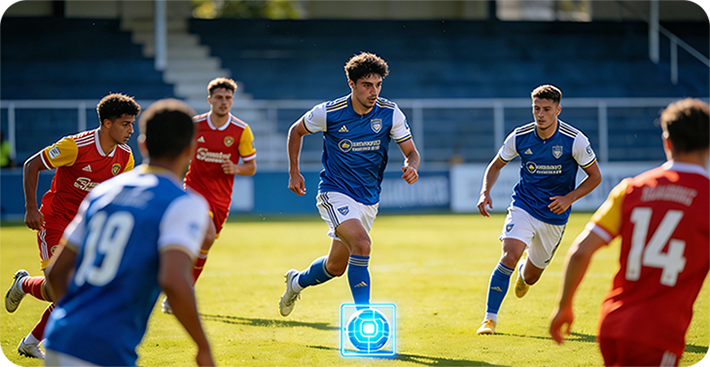
Every AI football camera before OWLREC forced you to make one impossible choice: either let the algorithm decide every shot, or film by hand and miss the action. OWLREC is the first to give you both — at the same time. You watch the AI track the ball in real time on your iPhone, and the instant you want a different angle, you take over with an on-screen virtual joystick and steer the camera yourself. It is the closest thing to a self-driving car with a steering wheel you can grab at any second.
The Auto-Tracking Dilemma Every Football Team Hits
Auto-tracking solved the biggest problem in amateur football recording: nobody wants to stand behind a tripod for 90 minutes. But once teams actually used the first generation of AI cameras, a new frustration appeared. The AI tracks the ball — and only the ball.
The best celebrations, the coach's reaction, the buildup run of a non-ball-carrying player, the bench erupting after a late winner: none of it makes it into the auto-tracked clip, because the algorithm was never asked to film it. And in most systems, there is no way to ask — that footage simply never exists in a form you can re-frame.
The Two Industry Approaches — and the Shared Blind Spot
Today there are two mainstream ways to produce an auto-tracking football video. Both deliver a finished clip, but neither lets you steer the tracking while it happens.
Approach 1: Cloud-Based Auto-Tracking (the Veo model)
With Veo, a panoramic video is uploaded to the cloud, and the auto-tracking video is generated on a remote server. The match is recorded wide, and the tracked version is rendered later, off-site. This means:
- You cannot see the tracking happen — you wait for a finished file.
- You cannot intervene while the cloud runs its auto-tracking render, so there is no way to influence the framing during generation.
- Veo does support post-match manual camera work, but it runs as a separate, independent flow from auto-tracking. The two are never combined: you either auto-track the entire video, or you manually frame the whole video — or manually edit the camera movement for just part of it.
In other words, Veo's auto-tracking generation and its manual editing are two distinct passes over the footage. You cannot switch between them mid-play, and you cannot steer the tracking while it renders.
Approach 2: Real-Time In-Lens Tracking (the XbotGo model)
XbotGo takes the opposite route: the device physically rotates the lens during the match to follow the ball in real time. It feels live, but the trade-off is severe — because the camera only ever records what the lens points at, it never captures the whole pitch. There is no full-field footage saved anywhere, so post-match personalization is impossible. What the AI decided in the moment is the only version that will ever exist.
Where the Two Mainstream Approaches Stop
| Capability | Cloud Auto-Tracking (Veo) | In-Lens Tracking (XbotGo) | OWLREC |
|---|---|---|---|
| See the AI tracking live | No — cloud render | No — lens only | Yes |
| Real-time manual override while tracking | No | No | Yes — virtual joystick |
| Auto-tracking + manual framing in one continuous take | No — two separate flows | No | Yes |
| Post-match manual framing / editing | Yes — separate pass | No | Yes |
| Full-pitch footage saved | Yes | No | Yes — 180° |
| Cloud upload & subscription | Required | Optional | None |
The OWLREC Breakthrough: On-Device AI You Can Interrupt
OWLREC takes a third path that neither cloud rendering nor a rotating lens can offer. Instead of sending the panoramic video away, OWLREC imports the full 180° footage into the iPhone and uses the phone's own AI compute to track the football while the video plays. Because everything happens on the device, the tracking is visible, interactive, and instant.
How It Works, Step by Step
1. Record the whole pitch. OWLREC captures the entire field in a single 180° panoramic frame, so nothing is ever lost — not the ball, not the players off the ball.
2. Import to the iPhone. The panoramic video is loaded straight onto your phone. No cloud, no render queue, no waiting for a server.
3. Watch the AI track in real time. As the video plays, on-device AI identifies and follows the ball and draws the tracked camera view live on your screen. You see exactly what the AI is choosing — frame by frame.
4. Take over when you want. At any moment, use the on-screen virtual joystick to push the camera wherever you like: pan to the sideline celebration after a goal, hold on a coach's reaction, or follow a non-ball-carrying player making a run.
5. Release, and the AI resumes. Let go of the joystick and OWLREC's auto-tracking instantly picks the ball back up. Auto and manual blend into one continuous take, not two separate workflows.
The Self-Driving Car Analogy
Think of OWLREC like driving with an advanced self-driving system. Most of the time the car steers itself, and you can relax and enjoy the ride. But the moment you want to take a detour, you simply put your hands on the wheel and steer — then let go, and the car takes over again. OWLREC works the same way: the AI drives the camera, and you can grab the wheel at any second, without stopping the recording and without starting over.
What Seamless Switching Unlocks on Match Day
Once you can switch between auto and manual tracking in the same playthrough, shots that used to be impossible become instant:
- The celebration shot. The AI is on the ball, but you pan to the sideline and the bench erupting — every emotion, not just the goal.
- The off-the-ball run. Give the lens to the striker making the decisive run before the pass even arrives.
- The coach's reaction. Cut to the touchline at the exact moment a decision goes against your team.
- The tactical wide. Pull back to show the full team shape, then snap back to the ball with one joystick release.
- The replay re-frame. Because the full 180° footage is saved, re-run the AI any time and build a second, personalized version of the same match.
OWLREC vs. Veo vs. XbotGo: The Tracking Control Gap
Produce a polished auto-tracking clip with no subscription and no cloud dependency — and still keep full creative control over every frame. That combination does not exist anywhere else.
One Camera, Two Modes, Zero Compromise
OWLREC is the industry's first AI football camera with seamless auto and manual tracking switching — powered entirely by the iPhone's on-device AI, with the full 180° pitch always saved. No cloud render, no subscription, no lost moments.
Get OWLRECFrequently Asked Questions
What is seamless auto and manual tracking switching?
It is OWLREC's signature feature: the AI tracks the ball automatically in real time on your iPhone, and at any moment you can take over with an on-screen virtual joystick to move the camera wherever you want. When you release the joystick, the AI instantly resumes tracking. There is no render queue and no upload to the cloud.
How is OWLREC different from Veo?
Veo uploads a panoramic video to the cloud, where the auto-tracking video is generated, and you cannot see or intervene in that generation process. Veo does support post-match manual framing, but it runs as a separate editing flow: you either auto-track the whole video, or manually frame the whole video (or part of it). The two are never combined. OWLREC processes everything on the iPhone itself — you watch the AI track live and can manually override the framing at any second, in one continuous take, including after the match. See our deeper breakdown in How to Fix AI Football Camera Tracking Problems.
How is OWLREC different from XbotGo?
XbotGo rotates the lens in real time to follow the ball during the match, so it never records the full pitch and offers no post-match personalization. Its cloud upload and subscription are optional extras, not requirements. OWLREC records the entire 180° field and lets you re-frame any moment later, or steer the camera live while the AI tracks. Learn more in 180° Panoramic Coverage: Zero Blind Spots.
Do I need the cloud or a subscription to use OWLREC tracking control?
No. OWLREC uses the on-device AI compute of the iPhone to track the ball while the panoramic video plays. The footage and the tracking data stay on your phone and your own storage, with no cloud render step and no subscription fee — see Why No Subscription Fee Makes OWLREC the Best Value.
Can I create a personalized highlight from a past match?
Yes. Because OWLREC keeps the complete panoramic footage, you can re-run the AI tracking any time and use the virtual joystick to pan to a sideline celebration, a coach reaction, or a specific non-ball-carrying player, then export that version as your own highlight.
Conclusion: Auto-Tracking With a Steering Wheel
Cloud auto-tracking hides its process and keeps manual framing on a separate track. In-lens tracking films only what the algorithm points at, so the full pitch is gone forever. OWLREC is the first AI football camera to combine both worlds: the convenience of automatic tracking and the creative freedom of a manual joystick, on-device on your iPhone, always keeping the complete 180° match footage.
The result is a camera that works like a self-driving car with a steering wheel you can grab whenever inspiration strikes. Let the AI drive, or take the wheel — the choice is yours, at any moment. Experience the difference with OWLREC.